

PDF is a document format which has gained more and more popularity over time. However, creating PDF documents may still be a complicated task. There are some applications - like the newest version of MS Word - that allow you to create PDF files directly. Fortunately, there are also tools like PDF4Free, which allow you to create PDF files from any printable document using any Windows application.
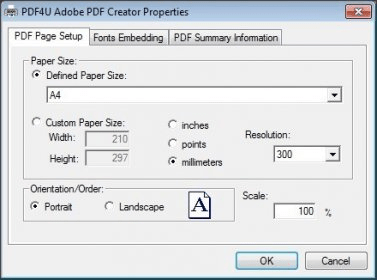
As most PDF creators, PDF4Free installs on your system as a virtual printer. Thus, it does not include a main window. To use the program, you need to open or create a document with any application and send it to print and select "PDF4U Adobe PDF Creator" as the printer. If you select to edit the printing preferences then you will get access to the only user interface PDF4Free provides. It is a small window that allows you to set the page size, its orientation, its resolution, and its scale. The program also supports font embedding. To do this, you can select the fonts from a list and move them into the "Embedded fonts" section.
Finally, you can also add some summary information to your resulting PDF files - you can set the document's title, subject, author, and some keywords. To sum up, PDF4Free allows you to create PDF documents from any file you can print - quickly, easily, and for free.






Comments